Practice Stroke Lab: watch your strokes in detail, and improve them
For ten years Smashpoint has been about matches. Points, momentum, ELO, the moments that decided a set. Practice got a timer and a few chips that said what you hit. But the vision of Smashpoint has always been bigger than the scoreboard: a data platform for the racquet sport ecosystem that enhances player development and brings match intelligence and analytics to your screen. Practice is where strokes actually change, and where players and coaches spend most of their hours together. We were measuring nothing there.
Stroke Lab is the fix. Turn on Live in New Practice, put your phone on the fence, hit balls. When you’re done, the footage is already edited down to the strokes, each one is measured, and there’s a single Focus for next time, in a coach’s words, with a drill. On your phone, on the web, or on the big screen with Apple TV.
Why practice was the blind spot
Before building this we talked to a lot of coaches, and the same thing came up every time: video is the best teaching tool they have, and the worst part of their week. Film a 45 minute session and you get 45 minutes of footage, most of it ball pickup, walking, and talking. Finding the six forehands worth showing a student means scrubbing through all of it, often that evening, unpaid. Several told us they’d stopped filming for exactly that reason.
Players had the mirror problem. Between lessons you hit against a wall, a machine, or a friend, and the only feedback is whether the ball went in. You can hit 200 forehands with a late contact point and feel productive the whole time, then spend the first fifteen minutes of your next lesson having your coach undo it.
So we built Stroke Lab for both sides of that lesson: the coach who wants the footage ready to teach from, and the player who wants to know what to work on when the coach isn’t there.
How it works
Stroke Lab lives inside the practice you already log. Open New Practice and turn on Live, the same way you turn on Track Live for a match. Forehand, backhand, and serve are selected for you; tap to change. Pick who you’re hitting with, a coach, a partner, a ball machine, or nobody. That’s the setup.
Then there are three ways to record, depending on what you have with you:
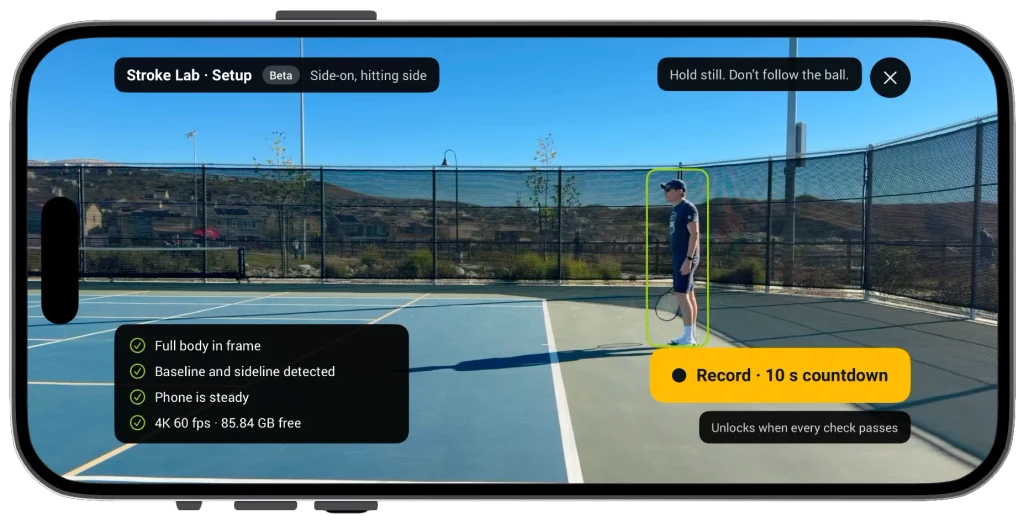
Just your phone. Prop it or mount it in landscape, side-on to where you’ll be hitting, about three to four meters away. The screen shows a silhouette and a short checklist: body in frame, court lines found, phone steady. When everything is green you press Record, get a ten second countdown with beeps so you can jog back, and go. After thirty seconds the screen dims to keep the phone cool in the sun; it’s still recording in 4K.
Your Apple Watch. Mount the phone, then do everything else from your wrist: set up, start, pause, stop. During the session the watch shows your rep count per stroke and the one number you’re working on, so you never walk back to the fence.
Someone holding the phone. A parent filming their kid, a friend at the net. Hold it steady, landscape, and don’t follow the ball. The screen stays on so you can see the rep counter, and there’s a Mark button for the swing you want to look at later. If you’ve already paired a second iPhone or iPad for match tracking, that works as the camera too.
The footage is edited before you see it
This is the part the coaches asked for first. When you stop, the phone cuts the dead time itself: ball gathering, walking to the basket, the chat at the net. What’s left is the hitting, each stroke as its own clip with two seconds either side, labeled forehand, backhand, serve, and numbered. A 45 minute session typically comes back as 20 minutes of strokes, and you see exactly what was kept: “Kept 19:40 of 45:10.”
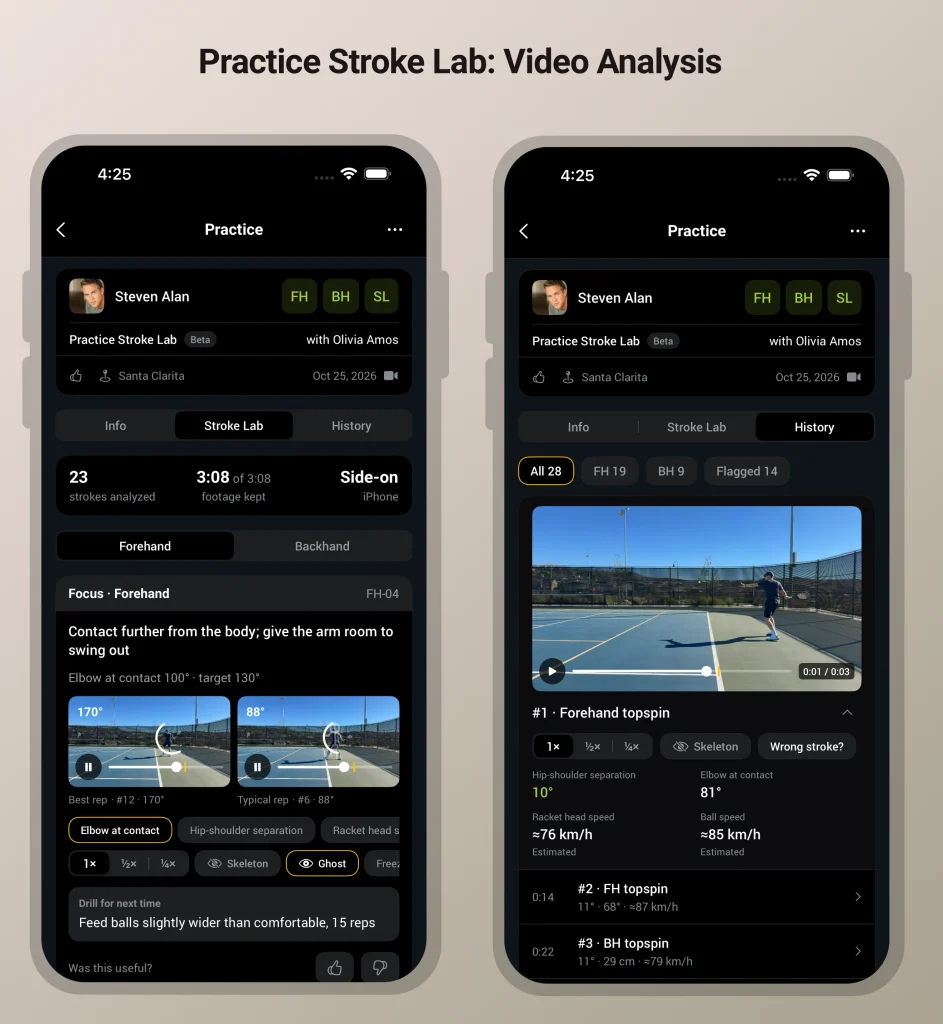
Nothing to scrub, nothing to trim, nothing to export into another app. Filter to backhands, tap the one you want, and it’s there with the angles drawn on it. One coach described the old way as “two hours of editing for ten minutes of teaching.” The editing is now zero.
What you get back
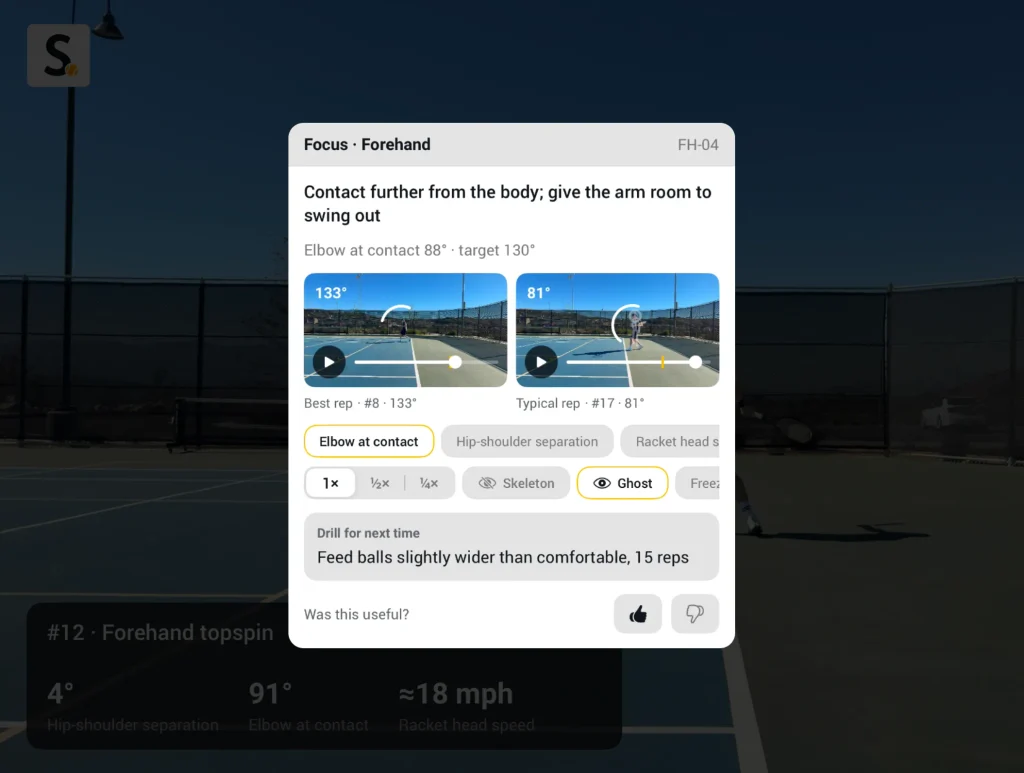
One Focus, not a dashboard. The Stroke Lab tab opens with a single card: the change most likely to improve your stroke, the number behind it, and a drill for next time. Something like: turn the shoulders past the hips before the swing starts. Your hip-shoulder separation averaged 34 degrees across 84 forehands; your best rep today reached 43. Here’s a twenty rep drill. That’s it. Everything else is below the fold for when you want it.
Your own best rep as the model. The card shows two clips side by side: your best swing of the session and a typical one, with the angle drawn on both and your best rep ghosted over the typical one. We do not overlay a pro. Your own body doing it right is a better teacher than someone else’s, and it’s honest about what you can actually do today.
Three numbers per stroke. Forehand gets hip-shoulder separation, elbow angle at contact, and racket head speed. Serve gets trophy elbow, hip rotation into contact, and ball speed. Each one is a bar against your target, and each one is tracked session over session so you can see a change land.
Every stroke, if you want it. The History tab is the stroke-by-stroke log, like the point-by-point log on a match: every swing with its clip, its numbers, and a scrubber. If we labeled one wrong, tap “Wrong stroke?” and fix it.
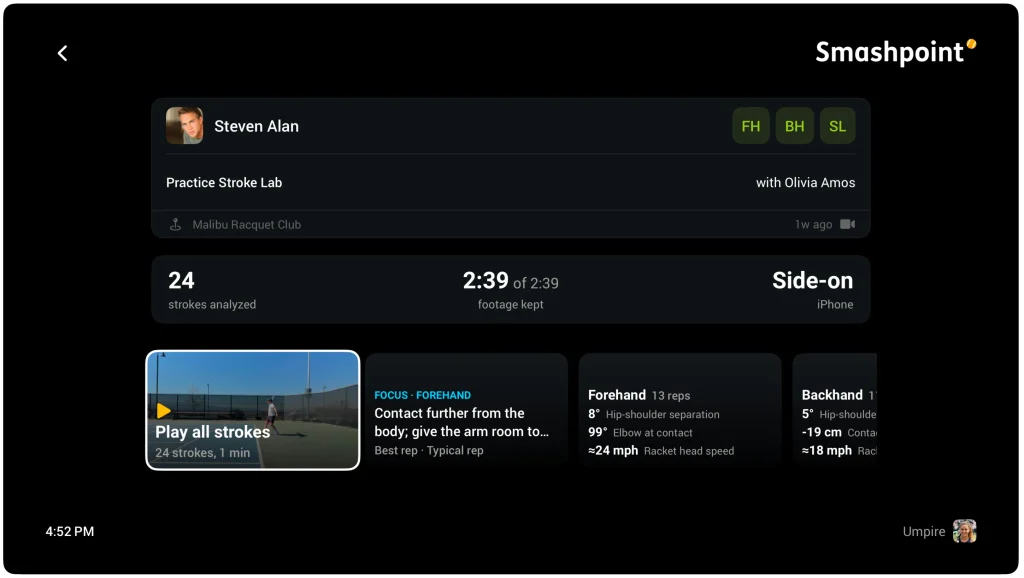
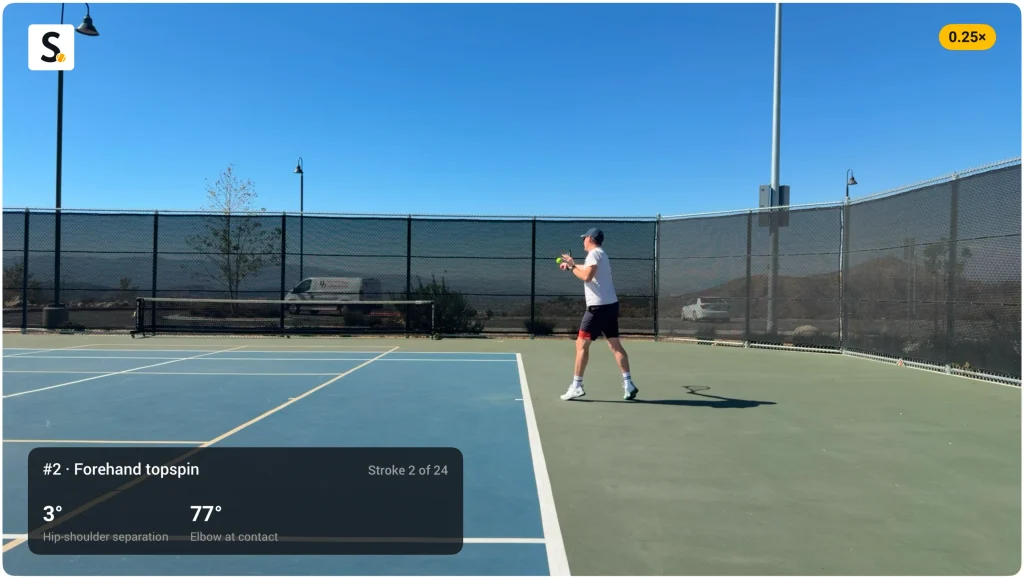
On the big screen. Smashpoint for Apple TV already shows your matches; now it plays your practice too. Open the session on the TV, pick a stroke, and watch it large at quarter speed, half speed, or normal, with the skeleton and the angle overlaid. For a coach with a student on the couch, or a parent with their kid, this is where the conversation happens: freeze at contact, step a frame, point at the elbow.
Smashpoint Apple TV: Practice Stroke Lab
The honest part
A few things we decided on purpose, and want you to know going in.
The advice is written by coaches, not generated. Every cue and every drill in Stroke Lab comes from a library a certified coach wrote and reviewed. The software picks which one applies to you and fills in your numbers. It never writes the coaching itself. If there’s no reviewed cue for what the camera sees, you get the numbers and no Focus, and the card tells you why. We think that’s better than confident nonsense.
One camera has limits. Angles measured in the plane the camera sees are solid. A rotation partly away from the camera, like shoulder turn from the side, is an estimate, and the app tints the number when it’s unsure. Ball and racket speed need court lines in the frame to scale; without them you’ll see “estimated” and we leave it out of your trends.
You need eight reps. A Focus is only computed from a stroke you hit at least eight times in the session. Three serves is not a pattern.
It needs a recent phone. 4K at 60 frames per second is the floor for the measurements to hold up. iPhone 12 or later, or a recent Pixel or Galaxy S. Older phones can still record; speed metrics are marked as reduced accuracy.
Your video stays yours
Same rules as match replays. Practice video never appears on a public page. Sessions are private by default and you share them one at a time, with people you’re connected to in Smashpoint. Deleting a practice deletes the clips, the pose data, and the numbers. Your label corrections are only used to improve recognition if you opt in, and that switch is off until you turn it on.
Part of Elite
Stroke Lab is part of Smashpoint Elite, the new tier above Pro. Elite also records every break point, set point, tiebreak, and match point in 4K when you track a match live. It’s 19.99 dollars a month or 149 dollars a year, and about half of what the match analysis services charge. Free and Pro stay exactly as they are, and Elite works on iPhone, Apple Watch, Android, the web app, and Apple TV. Every new account starts with a seven day Elite trial, so you can try Stroke Lab on your first practice.
What’s next
Footwork is the next metric set: stance, split step timing, recovery. GoPro support follows the second iPhone. And for clubs, academies, and schools, coaches will be able to set a player’s targets, pin their own Focus to a swing, and leave a note or a voice memo on the exact rep they mean. If you coach and want to help review the cue library, write to us; the first thirty entries are drafted and waiting for a second pair of eyes.
Go hit two hundred forehands. This time the good ones are already cut, measured, and waiting for you and your coach.
If you have any questions, get in touch with us.