Smashpoint
  • Home
  • Platform
  • Blog
  • About
  • Support
  • Login
  • Click to open the search input field Click to open the search input field Search
  • Menu Menu

Smashpoint Tennis MCP

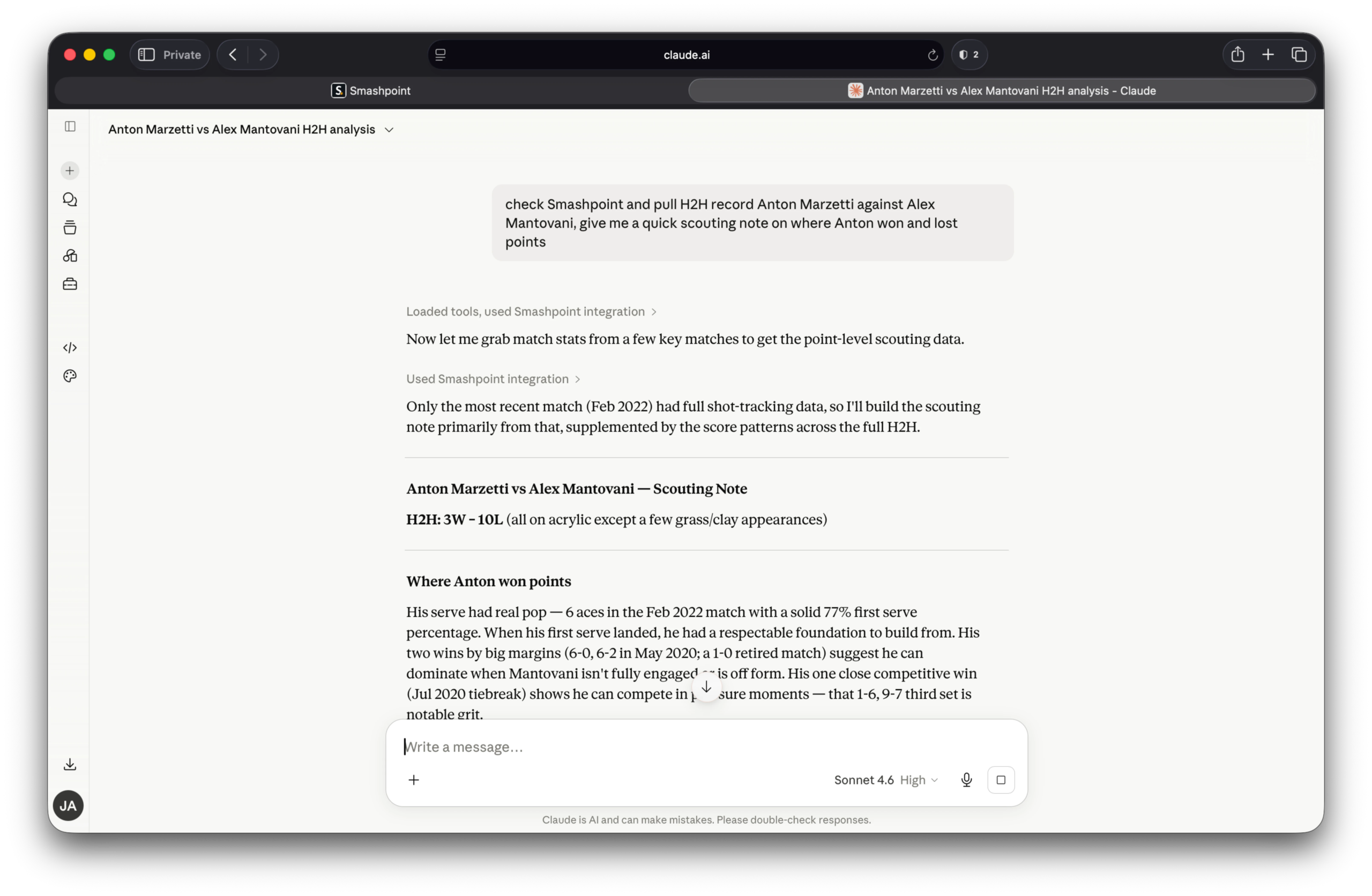
Claude.ai Smashpoint MCP Tennis

Unlock AI Insights from Your Tennis Data

Smashpoint Tennis MCP uses the Model Context Protocol to connect Smashpoint.pro’s detailed match data directly to your large language models. It empowers your local AI agents to seamlessly query real-time tennis statistics, head-to-head records, and shot metrics, bridging the gap between professional-grade sports analytics and advanced AI reasoning.

Smashpoint is now available as a connector inside Claude.

That means your match history, H2H records, stats, and ladder standings travel with you into every Claude conversation — no copy-paste, no switching apps, no manual context-setting. Ask a real question, get an answer grounded in your actual data. A few things you can do right now:

Before a match

“Pull my H2H record against Marcus Webb and give me a quick scouting note on where I’ve won and lost points against him.”

After a tough loss

“Look at my last 90 days of singles results and tell me where my win rate drops — by surface, by score line, or anything that stands out.”

Working on your game

“Based on my results across hard, clay, and grass, which surface should I be prioritizing in practice right now and why?”

That’s the idea. Your game, in context, whenever you need it.

Get Started

The Smashpoint MCP is fully unlocked for all active Pro subscribers. Free accounts can still test the waters with access to the last 3 match results. If you’re not on Pro yet, this is the perfect reason to upgrade. Go to app.smashpoint.pro to upgrade.
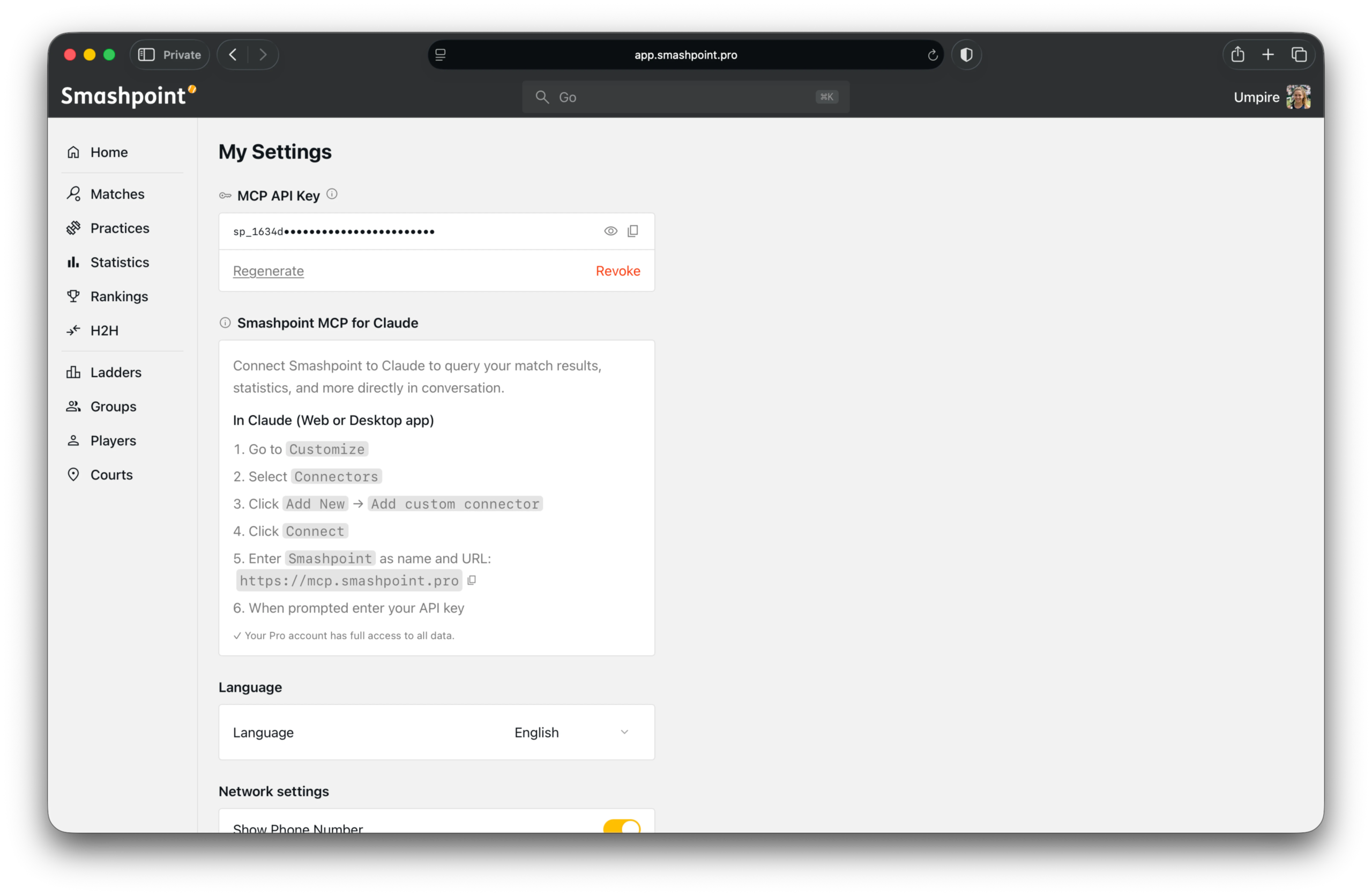
Smashpoint Settings MCP

Connect Claude

Step 1 — Generate your API key

Log into your Smashpoint account, go to Settings > Integrations, and generate your MCP API key. Copy it — you’ll need it in the next step.

Step 2 — Add the connector in Claude
Open Claude and go to:

  1. Customize
  2. Connectors
  3. Add New — select “Add custom connector”
  4. Enter Smashpoint as the name
  5. Enter https://mcp.smashpoint.pro as the URL
  6. Paste your API key when prompted

That’s it. Claude will confirm the connection and you’re ready to go.

A Note on Privacy

Your data stays yours. The Smashpoint MCP only surfaces data from your own account — your matches, your stats, your connected players. Nothing is shared with other users. You can revoke your API key from Settings at any time and the connection drops immediately.

What’s Next

This is the first version. We’re already thinking about what comes after — deeper stats, group and ladder context, and eventually org-level access for coaching programs. If you’re a coach or program director at a university or club and want to talk about what that could look like for your team, please get in touch.

For now — connect, ask, and let your data do some of the work.

Search Search

Categories

  • AI (2)
  • Editorials (2)
  • Gear (2)
  • Group (1)
  • Ladder (1)
  • MCP (2)
  • Release Notes iOS (18)
  • Release Notes Web (12)
  • Support (3)
  • Team Notes (4)
  • Tennis Clubs (19)
  • Tournaments (2)
  • Tracker (1)
  • Videos (2)
Smashpoint Brand Mark
  • Home
  • Platform
  • Features Free vs Pro
  • Blog
  • About
  • Support & Contact
  • Services
  • Bracket Templates
  • Apple iOS App Store
  • Web App Log In
  • Web App Sign Up
Copyright © 2016-2026 Smashpoint.pro All rights reserved. The Apple iPhone, iPad, Watch are trademarks of Apple Inc.
  • Terms & Conditions
  • Privacy Policy
Link to: We Rebuilt Smashpoint from the Ground Up Link to: We Rebuilt Smashpoint from the Ground Up We Rebuilt Smashpoint from the Ground Up Link to: Dynamic ELO Ratings Have Arrived on Smashpoint Link to: Dynamic ELO Ratings Have Arrived on Smashpoint Smashpoint Blog ELO RatingsDynamic ELO Ratings Have Arrived on Smashpoint
Scroll to top Scroll to top Scroll to top

This site uses cookies. By continuing to browse the site, you are agreeing to our use of cookies.

OK

Cookie and Privacy Settings


How we use cookies

We may request cookies to be set on your device. We use cookies to let us know when you visit our websites, how you interact with us, to enrich your user experience, and to customize your relationship with our website.

Click on the different category headings to find out more. You can also change some of your preferences. Note that blocking some types of cookies may impact your experience on our websites and the services we are able to offer.

Essential Website Cookies

These cookies are strictly necessary to provide you with services available through our website and to use some of its features.

Because these cookies are strictly necessary to deliver the website, refusing them will have impact how our site functions. You always can block or delete cookies by changing your browser settings and force blocking all cookies on this website. But this will always prompt you to accept/refuse cookies when revisiting our site.

We fully respect if you want to refuse cookies but to avoid asking you again and again kindly allow us to store a cookie for that. You are free to opt out any time or opt in for other cookies to get a better experience. If you refuse cookies we will remove all set cookies in our domain.

We provide you with a list of stored cookies on your computer in our domain so you can check what we stored. Due to security reasons we are not able to show or modify cookies from other domains. You can check these in your browser security settings.

Google Analytics Cookies

These cookies collect information that is used either in aggregate form to help us understand how our website is being used or how effective our marketing campaigns are, or to help us customize our website and application for you in order to enhance your experience.

If you do not want that we track your visit to our site you can disable tracking in your browser here:

Other external services

We also use different external services like Google Webfonts, Google Maps, and external Video providers. Since these providers may collect personal data like your IP address we allow you to block them here. Please be aware that this might heavily reduce the functionality and appearance of our site. Changes will take effect once you reload the page.

Google Webfont Settings:

Google Map Settings:

Google reCaptcha Settings:

Vimeo and Youtube video embeds:

Other cookies

The following cookies are also needed - You can choose if you want to allow them:

Privacy Policy

You can read about our cookies and privacy settings in detail on our Privacy Policy Page.

Privacy Policy
Accept settingsHide notification only