Official Match Mode: Smashpoint for Umpires and Referees
For ten years Smashpoint has been the app a parent, a coach or a teammate opens on the side of the court to track a match point by point. Today we are opening it to the person in the chair.
With Android 1.5, iOS 3.5 and the new Organizations web app, a certified official can run a sanctioned match in Smashpoint: code violations, medical timeouts, rain delays, score corrections and a signed result, all recorded as they happen and all under the rules your federation plays by.
We call it Official Match Mode.
Why we built it
Below the pro tour, officiating runs on paper. A roving umpire covers six courts with a clipboard. A tournament desk finds out about a point penalty when the players walk up arguing about it. When a result is questioned a week later, there is nothing to look at.
Meanwhile the same match was probably being tracked in Smashpoint by someone in the stands. We had the score, the serve, every point. What we did not have was the authority to say the result counted, or a record of what the official decided along the way.
Official Match Mode closes that gap. It does not replace the official. It gives them a better clipboard, and gives the federation a record it can trust.
Pick your rules
Tennis is governed differently depending on where and at what level you play. The ITF point penalty schedule starts with a warning. The USTA system starts with a point. A junior gets a mandatory ten minute rest after the second set; an adult gets two minutes. Coaching is permitted at a Grand Slam, from designated seats, and not at all in a USTA sanctioned tournament outside a rest period.
We read the rulebooks so you do not have to. The Organizations web app ships with rules profiles for the ITF World Tennis Tour, USTA Adult and Junior tournaments and USTA Adult League. Each one was built strictly from the official 2026 rulebooks, the ITF World Tennis Tour Regulations and the USTA Friend at Court, with every value traced back to the regulation it came from. Nothing in them is our interpretation. An Owner or Admin picks one in Settings and every official match in the organization runs under it.
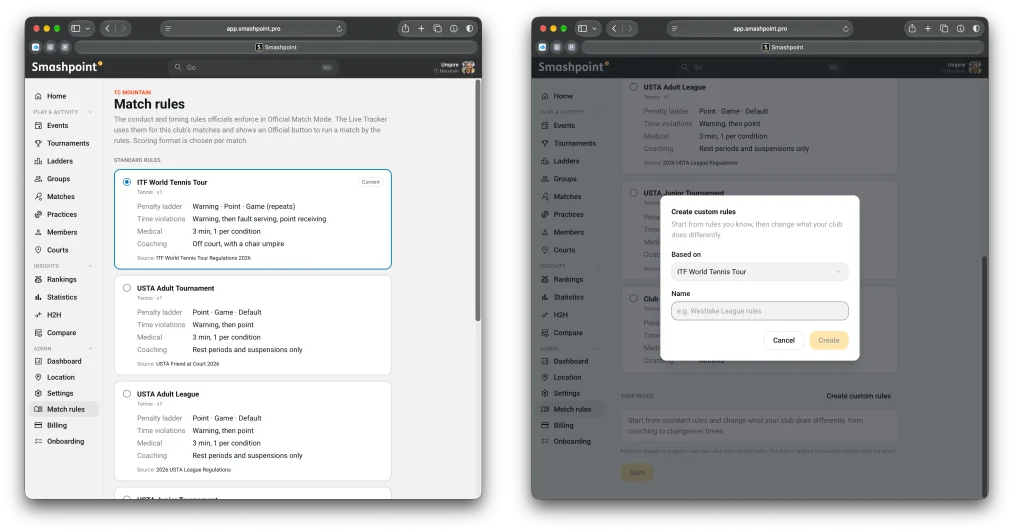
If your federation or state association plays by its own variant, clone a profile and change what differs. Changeover length, medical timeout limits, whether coaching is allowed, how the violation ladder escalates. Every change is versioned, every match records the exact version it was played under, and the official can see what was changed from the base rules before they walk on court.
On court
An official opens the live tracker the same way a parent does. The difference is one button.
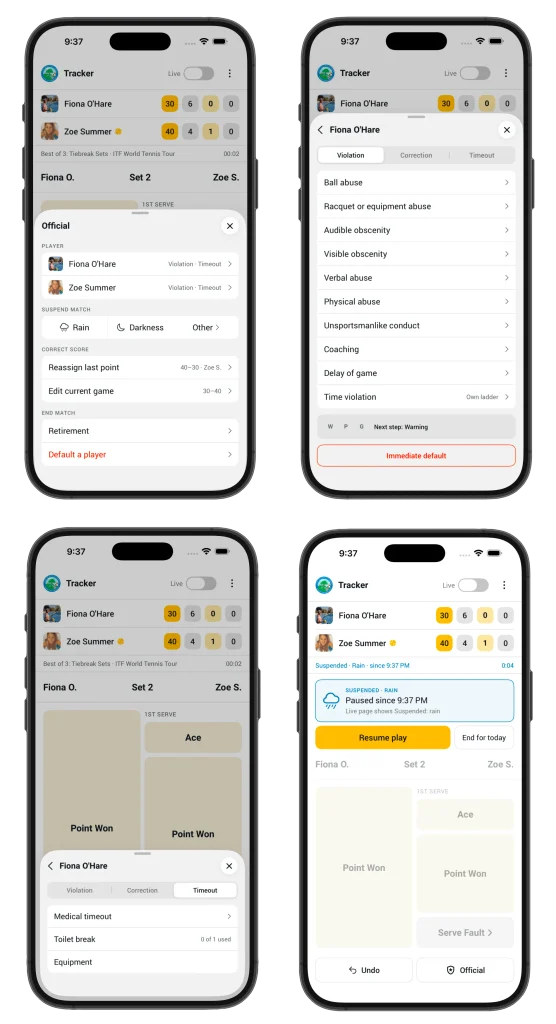
Tap Official and everything the chair needs is on one sheet. Pick a player to record a violation; the app knows which step of the ladder they are on and applies the penalty, so a point penalty is a point penalty and a game penalty is a game penalty, with the score updated for everyone watching live. Rain and darkness are one tap each. A medical timeout starts the countdown on screen. Score corrections are recorded as corrections, with who made them and why, never as silent edits.
At the end of the match the official reviews the result, the violations and the suspensions, and signs off. The match is locked and badged Sanctioned. It shows up that way in the organization’s rankings, in the export and on the public match page.
All of this works with no signal on a back court. Events queue on the phone and sync in order when it reconnects.
A new role
Organizations get a new member role, Official. It includes everything a Coach can do, plus running ladders and tournaments, plus Official Match Mode on the live tracker. Owners and Admins can also act as officials, so a tournament director can cover a court without changing their role.
Officials can record their certification body and number on their profile, and it travels with every match they sign off.
What comes next
Rules profiles for high school associations are next, state by state, starting in California. Pickleball and padel get their own profiles when those sports land in Smashpoint. And the same event log that records a code violation is ready to attach a video clip from the fence camera when we get there.
Available now
Official Match Mode is included in the Organizations plan. Update to Android 1.5 or iOS 3.5, ask your Owner or Admin to pick your rules in Settings and give you the Official role, and your next match is yours to run.
Not on Smashpoint yet? Log in or create a free account at app.smashpoint.pro, then create your Organization from the account menu. The first 14 days are on us, no card required, and every member who tracks or officiates a match gets Smashpoint Pro included.
If you officiate junior, college or club tennis and want to tell us what we got wrong, we would like to hear from you. Get in touch.